Virtual assistant
Installer
Planning
Installer startup guide (read first)
Global planning of a Climkit site
Process for setting up a Climkit site
Plan the connection of the Climkit Gateway and network connectivity
Schedule the electricity management
Plan the management of electric vehicle charging stations
Schedule the management of heating costs, water, and ancillary costs
Plan collective laundry management
Plan to manage eBike charging
General terms and conditions of sale
Platform configuration
Request for an Installer account
Creation of a new site
Add the router (4G or LAN)
Adding the Climkit Gateway
Adding electricity meters
Save the Photovoltaic installation information
Save the battery info
Adding charging stations
Add the OCPP Remote Electric vehicle charging station
Add the 4-relay I/O module
Adding RFID readers
Adding heat and water meters
Installation and connection
Install the 4G Router
Install the LAN router
Installing the Climkit Gateway
Install the RS485-Ethernet converter
Install the M-Bus converter
Install the standard Ethernet switch
Install the PoE Ethernet switch
Install Wi-Fi Access points
Install the electricity meters
Install the charging stations
Install the heat and water meters
Install the RFID reader
Install the three-phase Relay meter
Installing the Shelly relay meter
Install the 4-relay I/O module
Verification and testing
Owner
Administrative setup
Getting started guide - administrative setup
Form - 1. Contact details
Form - 2. Solutions
Form - 3. Billing rates
Contract and documents to be completed
Online account for owners
Information flyers for consumers
Online Access, RFID badge and charging stations
FAQ and other information
Resident
Account and app
Electricity invoice
Electric vehicle charging station
Building laundry room
Electric vehicle charging (eBike)
Platform
Platform Access
Terminology
Site
Settings
Creation/editing of a note or an issue to be addressed
Close an issue to be processed
Site statuses
Add/Modify building(s)
The steps for setting up a site
Delete/deactivate a site
Add/Edit equipment
Edit the basic information of a site
Equipment
Add/modify a gateway
Add/modify a router
Add/modify an electricity meter
Bulk insert meters
Bulk assign meters to a gateway
Add/modify a distribution zone
Add/edit a charging station
Add/modify a thermal meter or water meter
Add/edit a DSO meter (FTP transfer)
Connect remotely to a Climkit gateway
Administration
Stakeholders
Management terms
View the site management conditions
Enabling/disabling a solution
Configuration of the operating method
Visualize the financial conditions
Creation/edition/addition of a financial condition
Deletion of a financial condition
Accounts
Create a consumer account
Create a contact
Visualize and download account invoices
Send Platform Access to a contact
Add/modify the postal billing address
Link an existing account to a site
Change the correspondence method
Rates and billing points
Creation/editing of a billing point
Registering a move (transfer)
Assignment of an account to a billing point
Add/modify the default charge advance payment of a billing point
View site billing rates
Editing a consumption tariff
Creation/editing of a consumption tariff
Creation/editing of a consumption tariff component
View fixed rates and subscriptions
Customize invoice line item labels/titles
View the Financial conditions billed to the billing points
RFID badges
Accounting
Tools
Meter inspection
Visualization
Expense statements
Introduction to the Expense statement generation tool
Create/edit an accounting period for expense statements
Modify the expense statements settings
Add/modify a general invoice for an expense statement
Edit the advance payments collected for an expense statement
Special feature of room heating and hot water production fees
Verify and download meter readings for the expense statement period
Make the cost allocation and generate the expense statements
Export individual consumptions for the expense statements period
API
Table of Contents
- Categories
-
- Heating - Heating and water metering
Heating - Heating and water metering
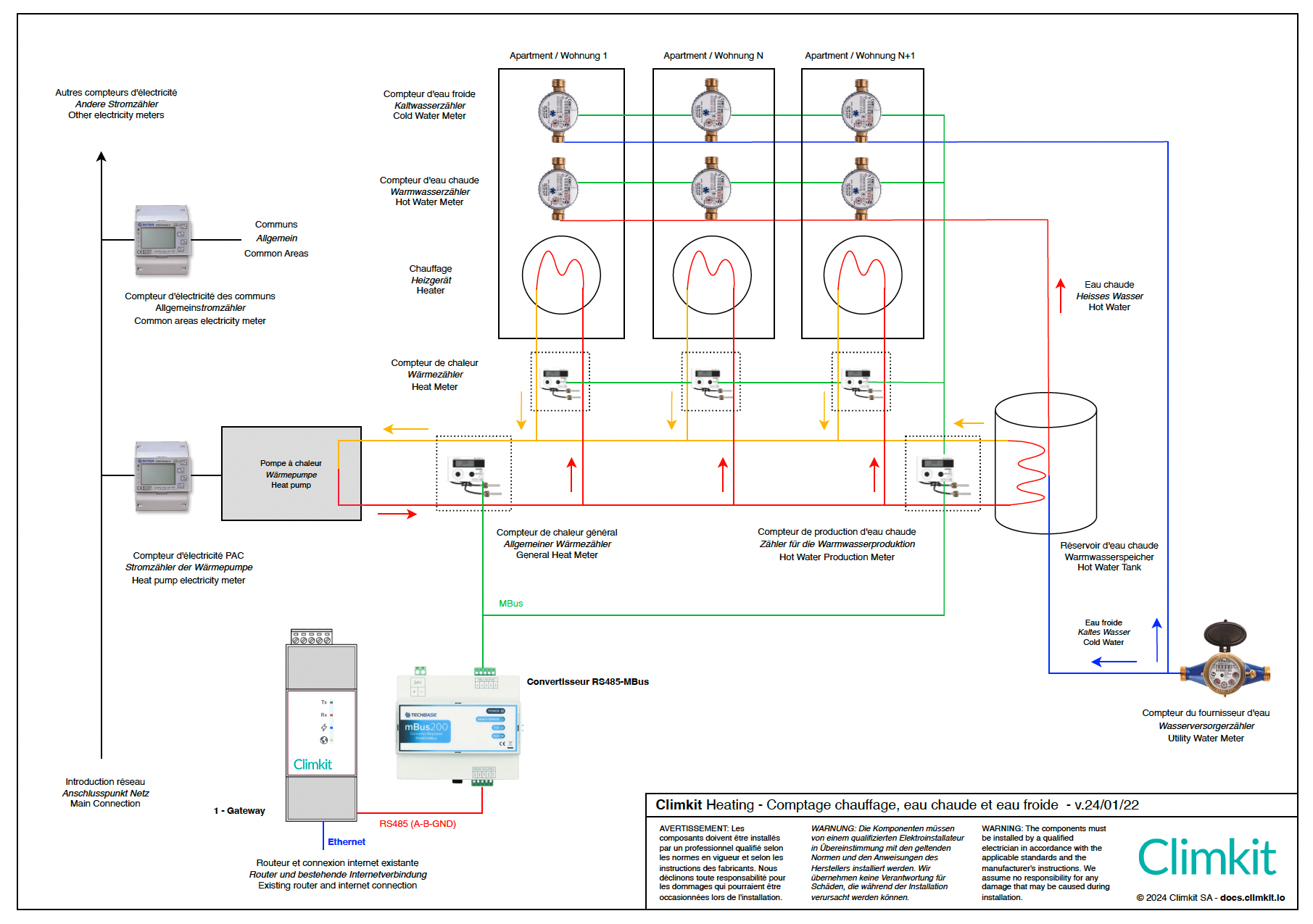
1. Connection Diagram
Individual heating and water metering allows for the fairest possible distribution of heating costs among the occupants of a building.
According to the requirements of the Swiss Federal Ordinance on the Individual Apportionment of Energy and Water Costs (DIFEE) in force since 2017, the following must be installed:
- a thermal energy meter (heating) per apartment
- a hot water meter per apartment
- a thermal energy meter at the boiler output to measure the total consumption and deduct the share for common areas
- a thermal energy meter at the water heater inlet to measure the energy required for hot water production
If it is desired to distribute water consumption and treatment costs fairly, a cold water meter is installed for each apartment as well as for the common areas (laundry room, irrigation, etc.).
2. Meter Connection
Thermal Meter Connection
The diagrams below also apply to boiler types other than Heat Pumps (e.g., wood, gas, etc.).
Scenario A: One main meter at the boiler output, one meter for hot water production, and one meter for each apartment.
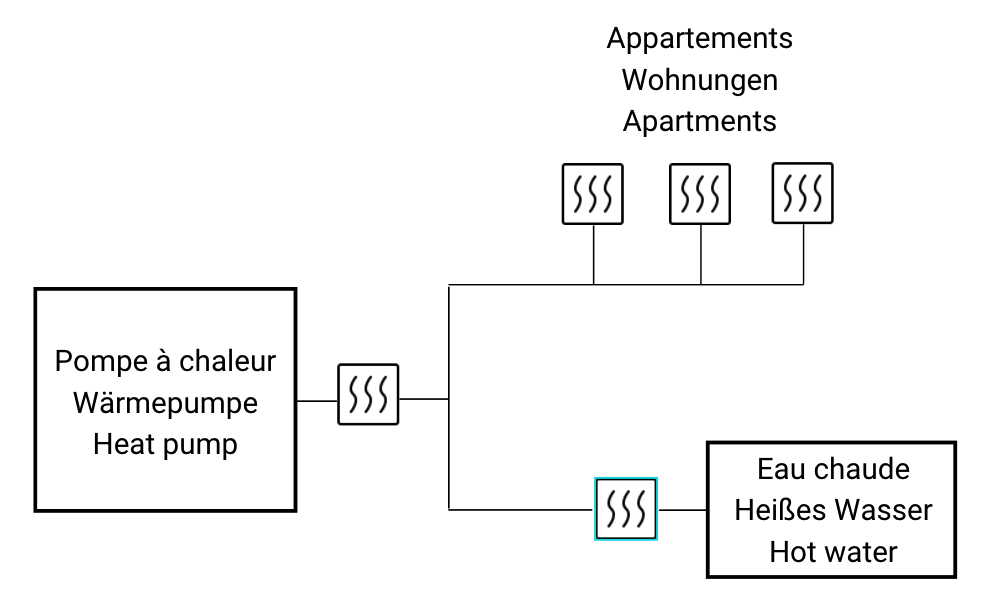
This is the correct diagram as recommended by official guidelines.
Impact on allocation:
- Heating costs are allocated among each occupant based on consumption measured by the individual apartment meters.
- Hot water production costs are allocated based on each person's hot water consumption, measured via individual hot water meters.
- Heating costs for common areas are allocated based on apartment floor areas.
Scenario B: Only one meter per apartment.
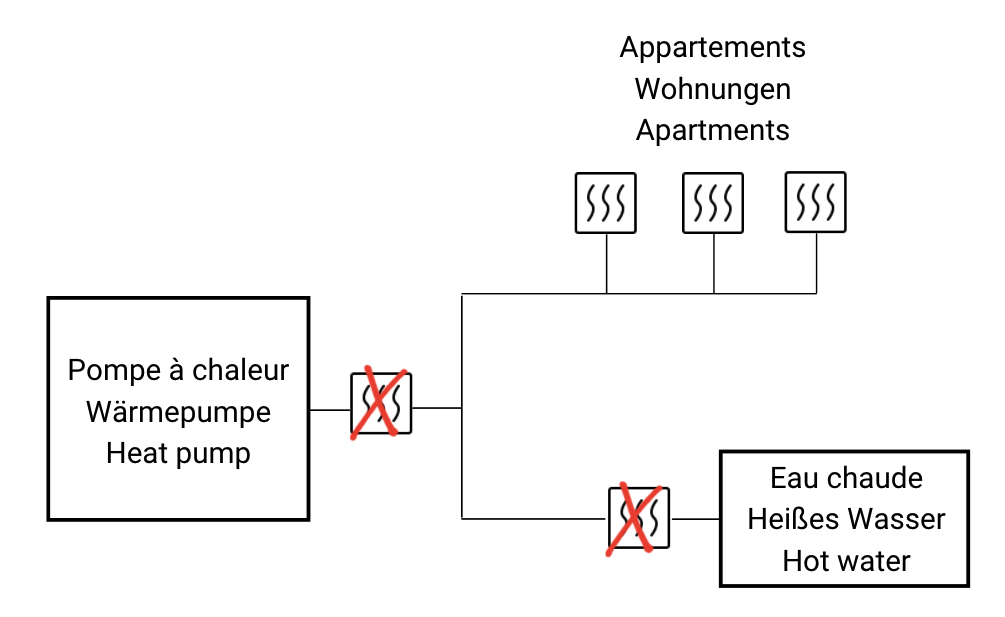
Not everything is measured.
Impact on allocation:
- Heating costs for common areas are estimated.
- Hot water production costs are estimated.
If the main meter at the boiler output is omitted, it is strongly recommended to install at least one meter for hot water production.
Nonetheless, without this meter, the usual estimate is 25% of the total costs dedicated to domestic hot water production.
Scenario C: No meters.
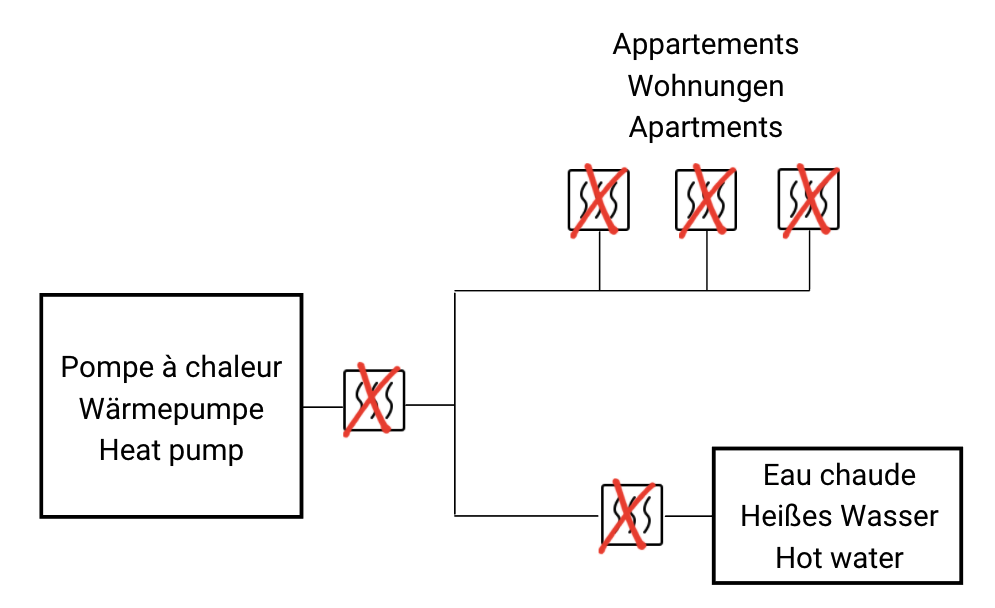
No thermal consumption is measured.
Impact on allocation: Heating costs are allocated based on apartment floor areas.
Electricity Meter Connection
If the heating system is a Heat Pump (HP), it is powered by electricity.
Scenario A: One meter for the HP and one meter for the common areas.
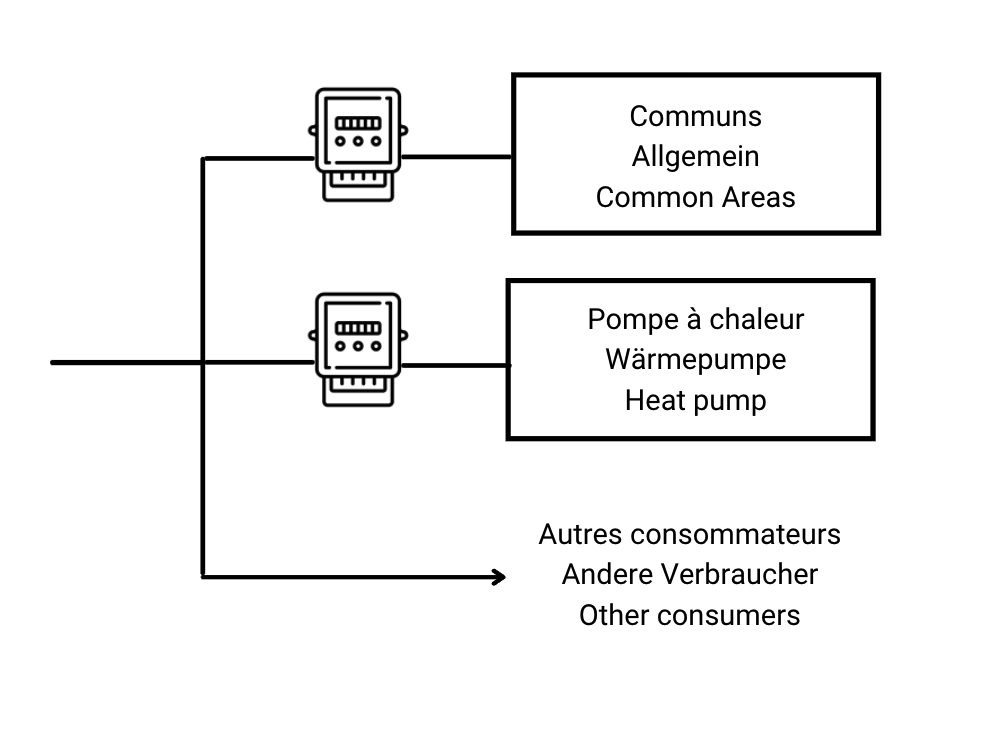
Impact on allocation: The HP's electricity consumption is separate from the common areas. No estimation is required.
Scenario B: A single meter for the HP and the common areas.
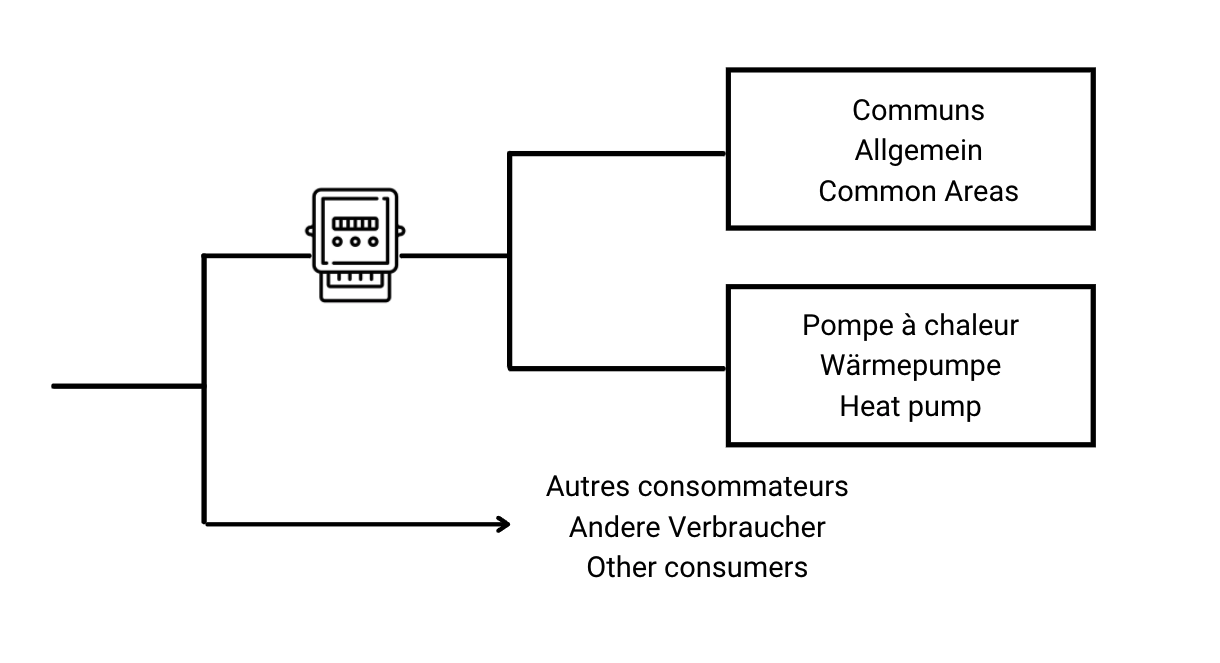
Impact on allocation: Common area electricity consumption must be estimated.
3. Installation Example
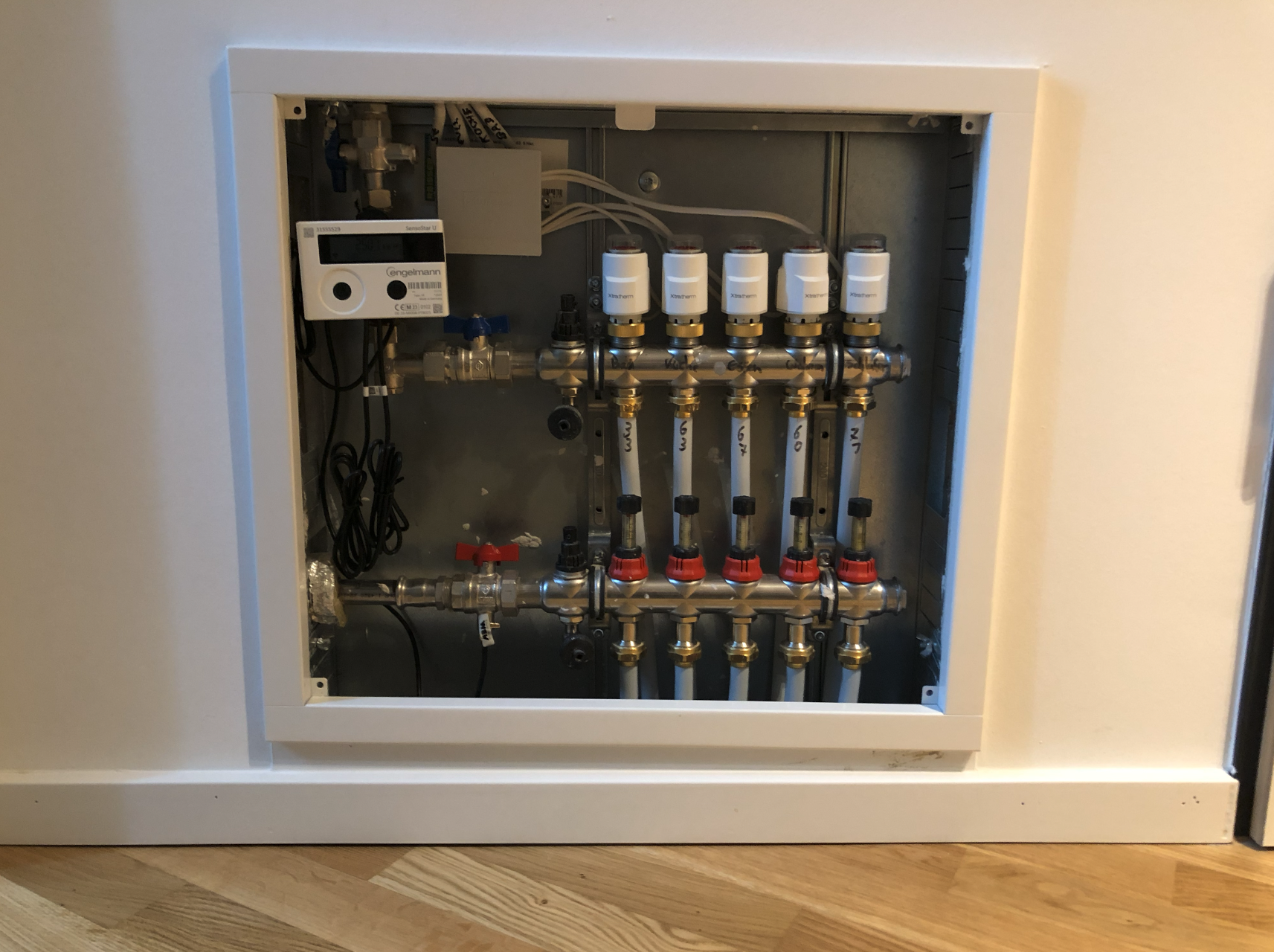
It is strongly recommended to position the underfloor heating manifold and the heating meter in an access hatch located at the apartment entrance, rather than inside a piece of furniture. This configuration greatly facilitates meter access for maintenance.