Table of Contents
Plan energy optimization and storage

This article describes the installation planning. For on-site implementation and equipment configuration on the Climkit platform, refer to the links at the end of the article.
The Climkit Energy Management System (EMS) controls certain devices based on solar production and manages a storage battery to make use of the surplus, for example at night.
Locally produced solar electricity is better utilized: the self-consumption rate increases, electricity purchases from the grid decrease, and the building gains autonomy. It is also possible to program timers to systematically switch on certain devices at different times of the day.
This article is divided into two parts: device control and the storage battery.
1. Device control
The Climkit EMS controls devices via a relay or a communication protocol based on excess solar production (fed back to the grid) or scheduled timers. The main use cases are hot water production, heat pumps, and electric vehicle charging.
Hot water production
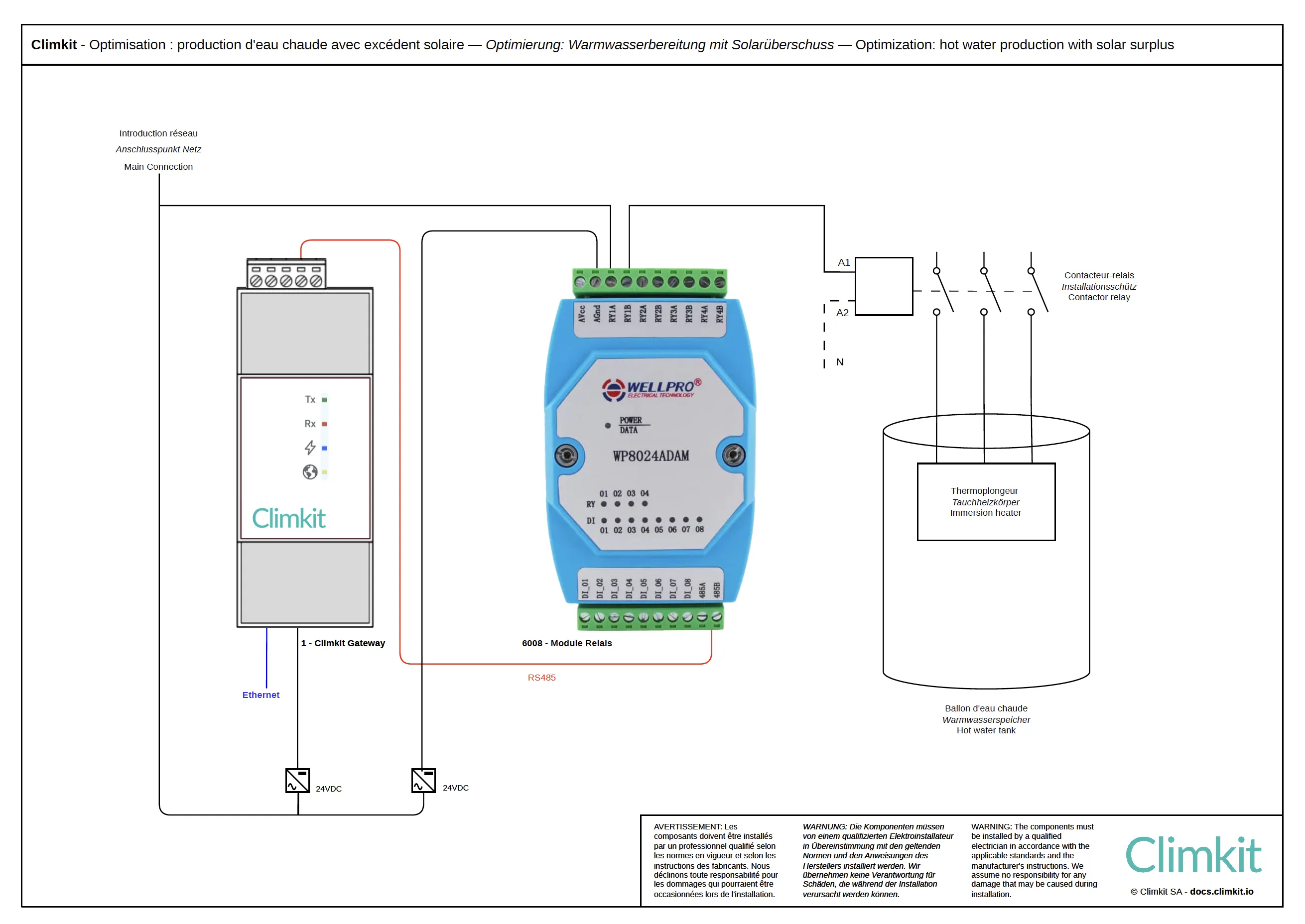
The EMS controls an immersion heater (heating element) installed in the hot water tank, solely based on excess solar production. The power of the heating element is configured in the Climkit EMS; when an equivalent or greater solar power is fed back to the grid, the relay switches on the heating element, which produces hot water for room heating or domestic hot water (DHW).
The immersion heater is inexpensive to purchase and highly responsive. It is often already present in the tank, as the primary water heater or as backup for a heat pump. It is a good way to store solar energy in the form of hot water.
Heat pump
Heat pumps (HP) also produce hot water, both for room heating and domestic hot water (DHW).
Unlike a simple immersion heater, a heat pump must be controlled via relay contacts called SG-Ready. This signal indicates to the heat pump that a surplus of solar electricity is available. It can then react according to its own programming, for example by increasing its setpoint temperature to store more hot water.
The Climkit Gateway can control these SG-Ready contacts in the same way as an immersion heater. Note, however, that the Gateway only transmits the solar surplus signal to the heat pump's management system, but does not replace it.
To maximize solar self-consumption, we recommend programming the heat pump to operate mainly between 9:00 AM and 6:00 PM. If the heat pump runs at night and fills its hot water tank to the maximum, it will not turn on during the day, even in the event of high solar production. However, settings should always be adjusted to maintain an adequate level of hot water in the morning!
Electric vehicle charging station control
Charging stations can be configured to charge plugged-in vehicles using only solar energy. This feature does not require any additional equipment beyond the infrastructure planned for charging stations (see Planifier la gestion des bornes de recharge pour véhicules électriques).
Users wishing to charge their vehicle regardless of this mode can activate the corresponding charging mode via the Climkit mobile app.
Climkit offering
Here are the additional products allowing device control:
- Equipment:
- I/O Relay Module
- Software features:
- Self-consumption optimization
- Commissioning service:
- Technical coordination and configuration
All these products are ordered directly from Climkit. As a general rule, an on-site intervention by a Climkit technician is not required for commissioning. Components are delivered pre-configured, allowing the installer to easily perform commissioning, with phone assistance from Climkit technical support if needed.
Details of equipment used
I/O Relay Module
The WP8024 I/O Module provided by Climkit has 4 relays.
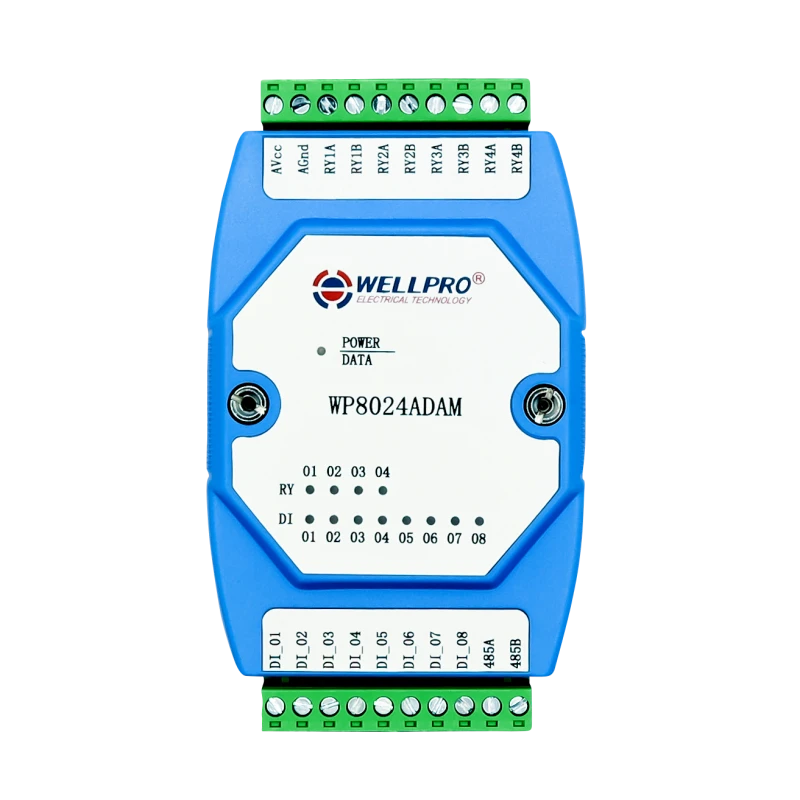
It comes with a 24V DC DIN rail power supply and connects to the Climkit Gateway via RS485-Modbus (like electricity meters).
2. Storage battery
A battery stores surplus photovoltaic electricity produced on a site, in order to use it when production becomes lower than consumption.
The Climkit Gateway can connect to the battery to:
- only read battery data: charged and discharged energy volumes, as well as the charge level (state of charge)
- directly control charging and discharging based on surplus production
Communication between the battery and the Gateway is carried out via Modbus TCP.
A battery can be connected in two ways:
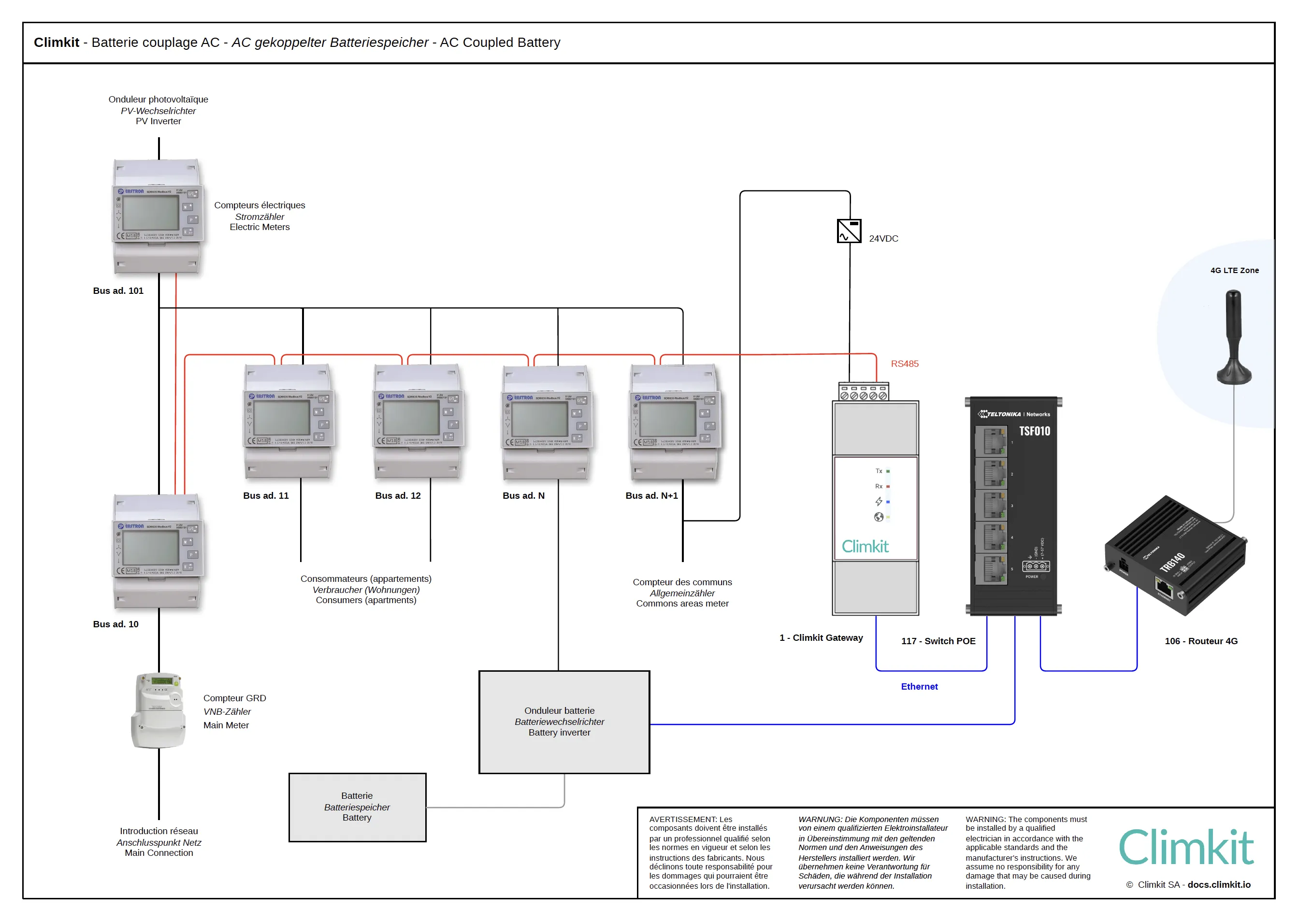
- AC coupling: the battery is connected to the electrical panel via its own inverter, independently of the photovoltaic inverter.
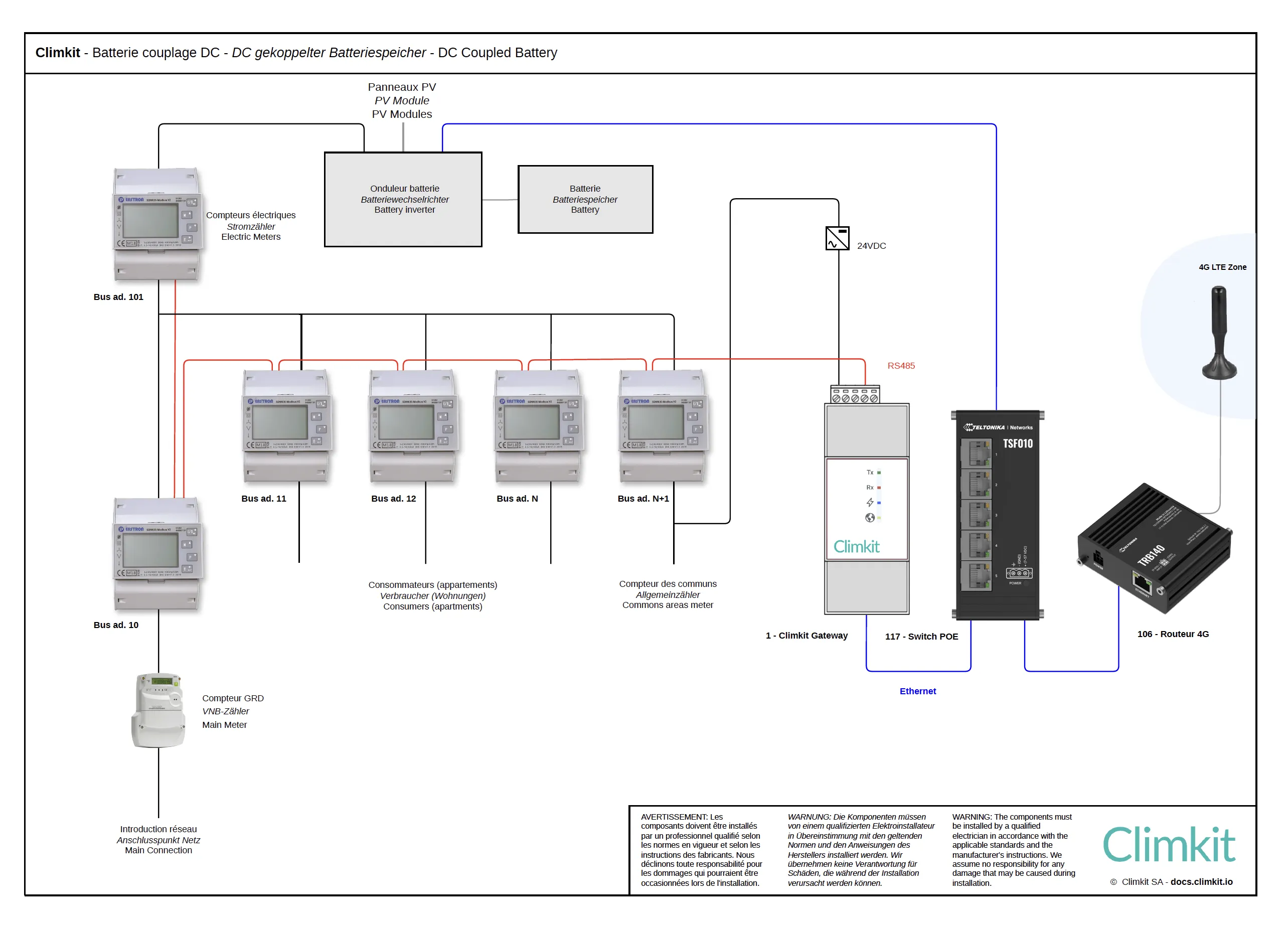
- DC coupling: the battery is connected directly to the photovoltaic inverter, known as a hybrid inverter.
Couplage AC
AC coupling is recommended for medium to large-scale installations, or when a standard photovoltaic inverter is already installed.
The battery, equipped with its own inverter, is connected to the electrical panel as an independent feeder. A dedicated Climkit private meter is installed on this connection and configured in "Battery" mode on the platform, in order to measure charged and discharged volumes and integrate them correctly into the site metering.
DC coupling
In DC coupling, the battery is connected directly to the hybrid photovoltaic inverter on the direct current side. This configuration is suitable for installations, generally small to medium-sized, equipped with a hybrid inverter. Since the battery is behind the photovoltaic production meter, no dedicated battery meter is installed. If the Climkit Gateway can read the hybrid inverter via Modbus TCP, the platform distinguishes solar production from battery flows.
RCPv / LEC case
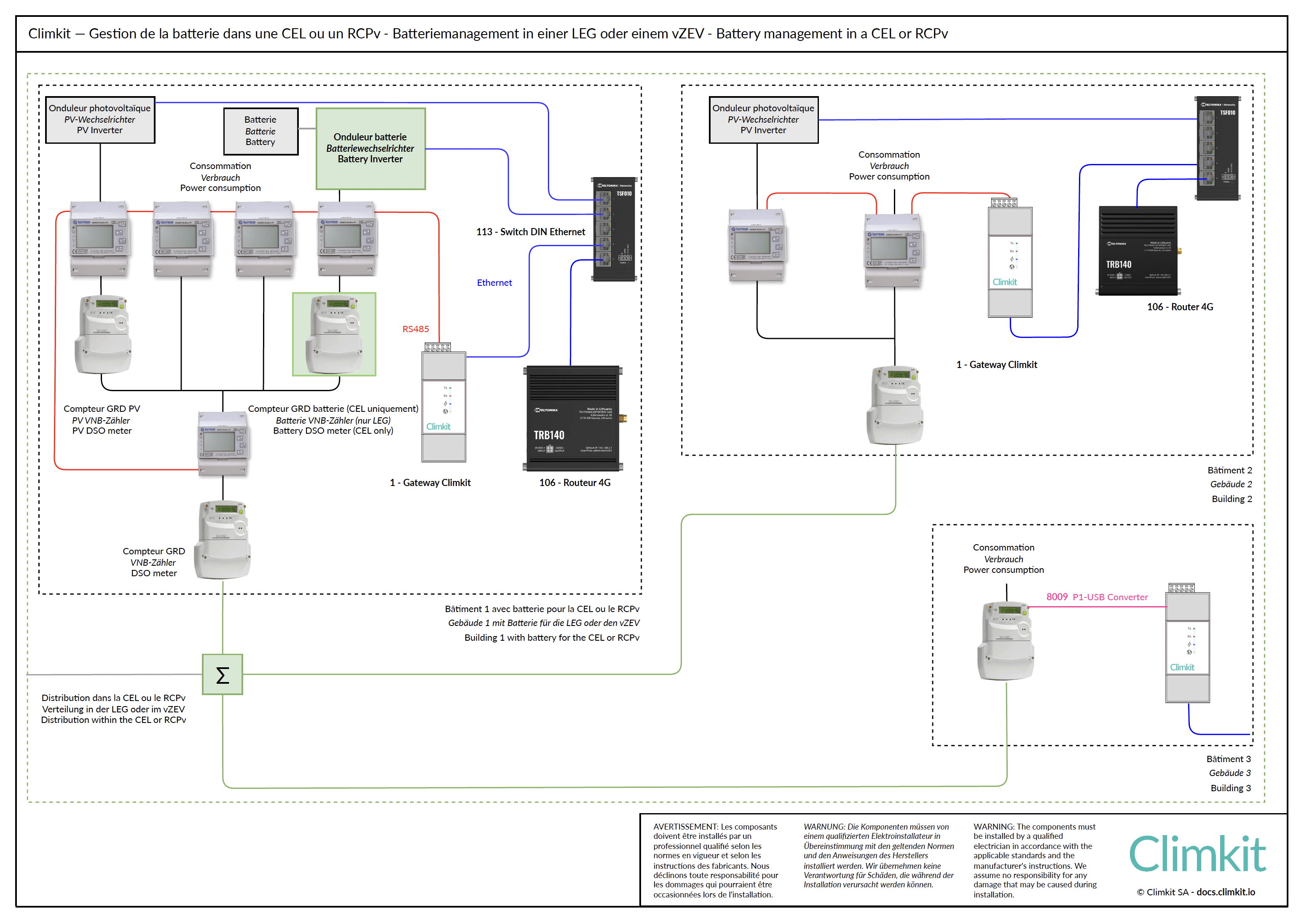
A shared battery in an RCPv or a LEC charges with the surplus from all buildings and discharges for their consumption. To control it, it is imperative to monitor all grid connection points in real time, not just the one for the building where it is installed, in order to decide when to charge or discharge the battery.
In a LEC, the battery is connected behind a dedicated DSO meter, which measures the electricity supplied by the battery to LEC members.
A building that only has its DSO meter (building 3 in the diagram) is monitored by reading this meter directly, via its P1 port and the USB-RJ12 converter (see below).
Climkit offering
Here are the additional products allowing battery management:
- Equipment:
- Ethernet switch, if needed to connect the battery
- USB-RJ12 P1 port converter, if needed to read a DSO meter
- Software features:
- Battery management
- Commissioning service:
- Technical coordination and configuration
All these products are ordered directly from Climkit. As a general rule, an on-site intervention by a Climkit technician is not required for commissioning. Components are delivered pre-configured, allowing the installer to easily perform commissioning, with phone assistance from Climkit technical support if needed.
Details of equipment used
USB-RJ12 P1 port converter
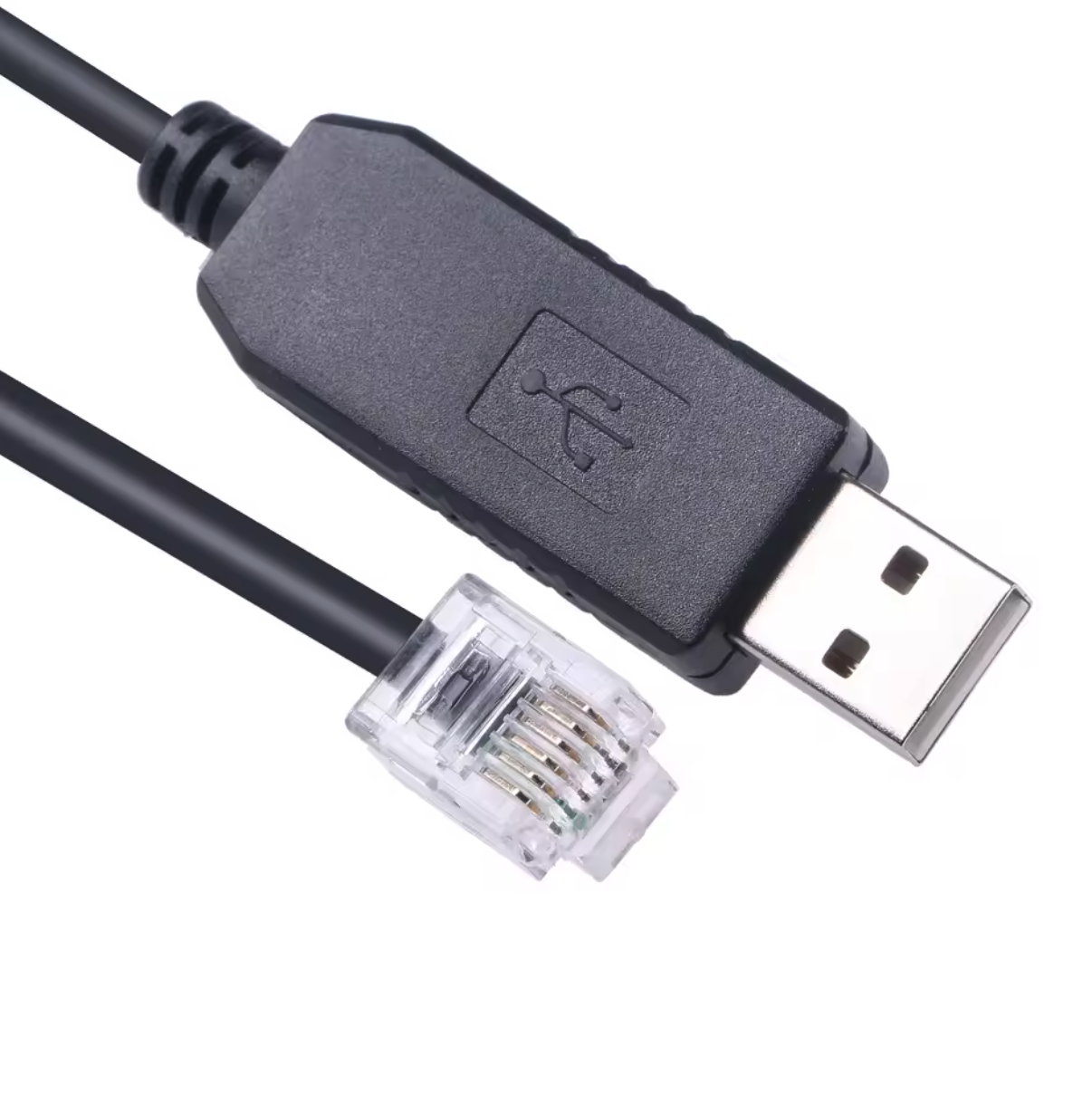
DSO meters transmit their data once a day, for the previous day, which does not allow for real-time control. The USB-RJ12 converter connects the Climkit Gateway to the DSO meter's P1 port: the Gateway thus reads meter data in real time. Up to two meters can be connected to the Gateway, for example for the input meter and the production (or battery) meter.
Cable length: 3 m.
3. Next steps
Device control:
Storage battery: